
Messages: SMS Texting App
Apps SpecialsCommunication
3.93.23K Reviews
- Version
- 2.7.12
- Installs
- 10.00M
- Age Rating
- Everyone
Screenshots
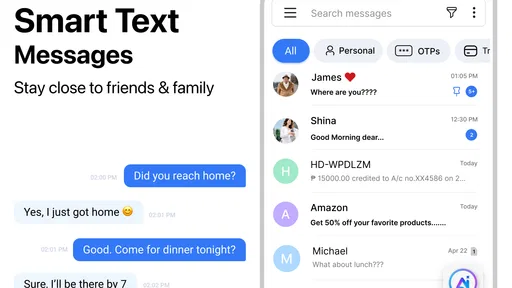
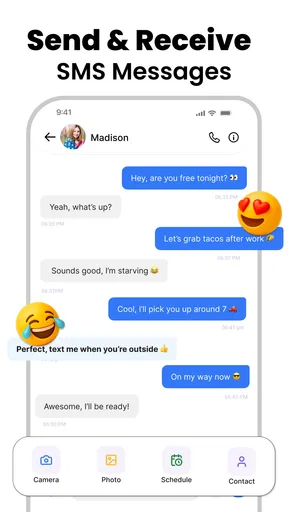
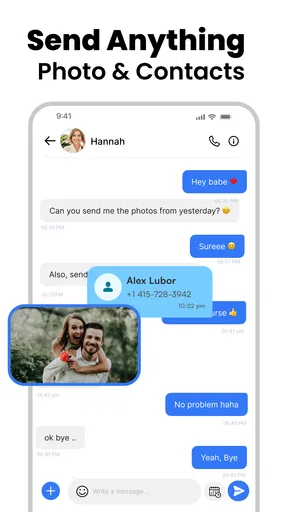
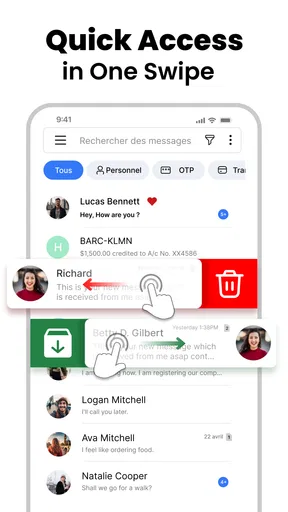
Our Review of Messages: SMS Texting App
 Analysis by Appyee
Texting looks simple until a busy day turns into a stream of missed replies, forgotten reminders, and conversations spread across several apps. Messages: SMS Texting App, developed by Apps Specials, is built around a familiar idea: keep SMS and MMS communication in one place while making scheduled messages part of the routine. After using it as a practical communication tool, I found its strongest quality is not novelty. It is the way it can make texting feel more deliberate.
The app is free to use, with optional in-app purchases ranging from $1.99 to $49.99 per item. It belongs to the communication category and is suitable for Everyone, so its appeal is broad: families, students, small teams, and anyone who still relies on regular mobile messaging rather than an account-based chat service. Its current version is 2.7.3, and it works on devices running Android 6.0 or later.
The useful change is rhythm. Instead of treating every message as something that must be written and sent immediately, I could separate composing from delivering. That small distinction matters when I want to stay helpful without allowing texting to control my attention.
Making everyday communication easier to place
The app makes the most sense for people whose communication needs are practical rather than elaborate. SMS remains useful when I need to reach someone without asking them to join a particular chat platform, and MMS is still convenient for sending pictures or group messages through the phone network. A dedicated texting interface can also feel less distracting than a social app filled with feeds, reactions, channels, and unrelated notifications.
In daily use, I would choose this kind of app for messages that have a clear purpose: checking whether someone got home, reminding a relative about an appointment, confirming a pickup, or sending a short update to a group. Those exchanges do not need a large social layer. They need a readable thread, a dependable sending process, and enough control to avoid losing the thought before the right moment.
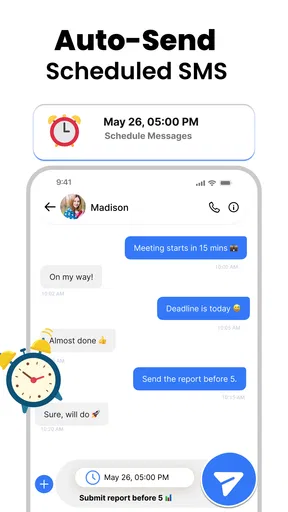
The scheduling option is the feature that changes the way I plan communication. I can prepare a message while the idea is fresh, then arrange for it to go out later. That is more useful than it first sounds. If I remember a task late at night, I do not have to send a notification immediately. If I am preparing several reminders before a busy morning, I can handle them together instead of interrupting the next day repeatedly.
A realistic example is a family schedule. I might write a message in the evening telling someone to bring a document to an appointment, but choose a more reasonable delivery time for the morning. The recipient gets the reminder when it is relevant, while I avoid relying on memory or setting up a separate alarm just to remember to text. The app becomes a small planning aid rather than merely a place to type.
Where the familiar SMS model helps
Compared with internet-based messengers, traditional texting has a different kind of reach. The recipient does not need to use the same branded service for the conversation to work. That makes the app a sensible choice when contacts have mixed habits or when a short message should remain independent of a particular social network.
At the same time, I would not mistake that reach for a complete replacement for modern chat platforms. Internet messengers usually offer richer group management, more expressive media tools, and stronger continuity across devices. If my conversations involve large files, active communities, voice calls, or detailed reactions, I would choose a service designed for those tasks. This app is at its best when communication should stay direct and lightweight.
The developer, Apps Specials, has kept the concept focused around messaging rather than turning it into a broad productivity suite. That focus is welcome because it reduces the number of decisions I need to make. I open it to handle texts, not to browse for another feature. Still, the simplicity means the experience depends heavily on how well the standard messaging workflow fits my phone and habits.
How scheduling changes conversation flow
Scheduling introduces a useful pause between intention and delivery. Normally, writing a message and sending it are almost the same action. Here, I can decide whether the message belongs right now, later today, or at another suitable point. That encourages clearer communication because I have a moment to consider the recipient’s context.
I found this especially valuable for reminders. A message sent too early can be forgotten, while one sent too late may be useless. Scheduling lets me place the reminder closer to the event without depending on my own availability at that exact time. It also helps when I am traveling, working irregular hours, or preparing several routine messages in advance.
There is a trade-off: scheduled communication can feel less spontaneous. A carefully timed message may be efficient, but it cannot replace a real conversation when someone needs an immediate response. I would use scheduling for reminders, updates, and planned check-ins, not for sensitive discussions where timing and emotional context need my attention.
Another practical habit is to review the wording before scheduling. A message written in a hurry may make sense to me at the moment but look vague later. I recommend including the essential detail in the text itself: what needs to happen, when it matters, and whether a reply is needed. That makes the scheduled message useful even if the recipient reads it quickly.
Keeping conversations clear instead of merely busy
SMS threads can become confusing when several topics are mixed together. A reminder, a question, and a last-minute change may all sit in the same conversation, making it difficult to see what still needs an answer. The app does not magically solve that human problem, but its straightforward messaging role encourages me to write shorter, more focused texts.
My preferred approach is one purpose per message whenever timing matters. For example, I would send the appointment reminder separately from a request to bring paperwork. That makes the conversation easier to scan and reduces the chance that an important detail disappears inside a long paragraph.
For group messaging, clarity becomes even more important. I would identify the intended audience in the wording rather than assuming everyone knows who should act. This is one reason I see the app as better for compact coordination than for extended group discussion. Once a group conversation becomes a running debate, a richer chat platform may be easier to follow.
The app also suits people who want communication to remain visible and concrete. A text can serve as a simple record of an instruction or arrangement. That does not make it a formal task manager, and I would not treat it as one, but the message history can help me revisit what was said without reconstructing the conversation from memory.
Attention, boundaries, and the cost of being reachable
The biggest benefit I noticed is connected to attention. Messaging apps often make every incoming exchange feel equally urgent. A dedicated SMS tool cannot decide which messages deserve an immediate answer, but scheduling helps me avoid creating unnecessary urgency for other people. I can write when I have the thought and send when the communication makes sense.
This is a healthier rhythm for routine contact. Instead of interrupting someone late at night with a non-urgent reminder, I can prepare it for a more appropriate time. Instead of opening the app repeatedly during a busy period because I am afraid of forgetting something, I can organize messages in one sitting. The result is not silence; it is more intentional timing.
There is also a boundary benefit for the sender. I can finish a communication task without inviting an immediate back-and-forth. That distinction matters when I need to pass along information but cannot stay available for a conversation. A scheduled text can communicate the necessary point while protecting a block of focused time.
However, the same convenience can encourage over-automation. If I schedule too many messages, communication may start to feel mechanical. Recipients might receive reminders that are technically timely but lack the warmth or flexibility of a personal exchange. I would keep scheduled messages short and practical, then handle replies personally when the subject calls for it.
What I would check before relying on it
Before making it my only texting tool, I would test the complete path with a low-stakes message: composing, sending, receiving, replying, and scheduling. Messaging depends on the phone environment as much as the app interface, so I want to see how it behaves with my contacts and normal notification habits. A test also helps me learn where scheduled messages appear and how easy they are to review before delivery.
I would be particularly careful with important reminders. For something time-sensitive, I would not rely on a scheduled text as the only safeguard. A calendar alert or personal alarm may still be necessary because the recipient might not read the message, and a text is not the same as confirmation. The app can support a communication plan, but it should not be confused with proof that someone has acted.
People who use multiple devices should also think about their preferred workflow. This is an Android app with a minimum operating-system requirement of Android 6.0, so it is most natural for someone who wants to manage texting from a compatible Android phone. If I regularly switch between platforms or expect seamless conversations across a laptop, tablet, and phone, an internet-based messenger may offer a smoother overall experience.
The free entry point makes it easy to try without committing money first. Optional purchases are available, but I would decide whether they are worthwhile only after using the basic workflow and identifying a real need. Paying for extras does not change the fact that the app’s core value comes from organizing ordinary SMS and MMS communication more thoughtfully.
Who benefits most from this approach
I would recommend it to someone who wants a focused texting environment and often remembers messages at inconvenient times. It is also a good fit for families coordinating errands, people who send regular reminders, and users who prefer phone-number-based communication over account-based communities. The scheduling function is particularly useful for anyone whose work or sleep schedule does not match the recipient’s.
It can also help a person who tends to send messages impulsively. Writing first and choosing the delivery moment later creates a small decision point. That is enough to turn “I need to tell them now” into “I need to make sure they receive this at a sensible time.” For routine communication, that is a meaningful improvement in boundaries.
I would be less enthusiastic for someone seeking a full collaboration tool. If the main requirement is live group discussion, file sharing, voice communication, device synchronization, or a large collection of expressive chat features, the usual internet messenger is likely a better match. Likewise, people who rarely use SMS will gain little from installing a dedicated texting app simply because it exists.
The rating sits at a 3.9 average from around 187 thousand ratings, with roughly 3 thousand written reviews, and the app has passed 10 million installs. Those figures suggest a substantial audience and enough public experience to make it a familiar option, but they do not remove the need to judge it against personal habits. A messaging app can be well established and still feel unnecessary if my existing phone app already handles scheduling and organization well.
My verdict on communication without constant interruption
Messages: SMS Texting App is most convincing when I treat it as a tool for intentional contact, not as a replacement for every form of conversation. Its combination of SMS, MMS, and scheduled texting addresses a real everyday problem: the gap between remembering something and choosing the right time to deliver it.
I like that it supports a calmer communication rhythm. I can prepare a useful message without demanding an immediate reaction, keep routine exchanges separate from noisy social spaces, and use timing to respect both my attention and someone else’s. Those are modest changes, but they add up when texting is part of every day.
The limitations are equally clear. It does not make SMS as rich as a modern chat platform, and scheduling should not be used as a substitute for judgment, confirmation, or a sensitive conversation. Some users will also find that their phone’s built-in messaging app already covers everything they need.
For my own use, I would keep it for practical communication: reminders, planned updates, family coordination, and messages that should arrive at a considerate time. If that describes your routine, this is a focused way to put boundaries around texting without making it complicated. If you mainly want lively group chats and cross-device collaboration, I would look elsewhere. The social verdict is simple: it is a worthwhile free option for people who want SMS to fit around life, rather than letting every message interrupt it.
Privacy and Permissions
See what permissions an app requests and how it handles your data.
- Contacts
- read your contacts
- SMS
- read your text messages (SMS or MMS), receive text messages (MMS), receive text messages (SMS), send SMS messages, edit your text messages (SMS or MMS)
- Phone
- directly call phone numbers, read call log, read phone status and identity
- Photos/Media/Files
- read the contents of your USB storage, modify or delete the contents of your USB storage
- Storage
- read the contents of your USB storage, modify or delete the contents of your USB storage
- Camera
- take pictures and videos
- Wi-Fi connection information
- view Wi-Fi connections
- Device ID & call information
- read phone status and identity
- Other
- view network connections, full network access, change your audio settings, run at startup, draw over other apps, control vibration, prevent device from sleeping, install shortcuts, uninstall shortcuts, Google Play license check
Verdict
Strengths of Messages: SMS Texting App
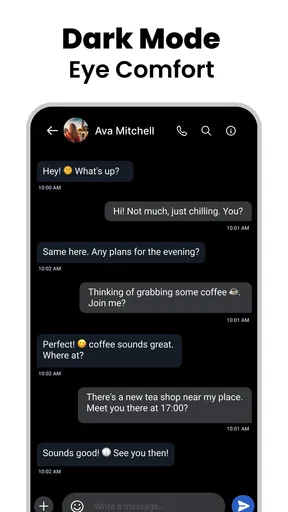
- Clean interface makes conversations easy to read and manage.
- Supports group chats for keeping up with family, friends, or teams.
- Message search helps you quickly find older texts and shared details.
- Custom notification controls reduce interruptions from less important chats.
- Works well for users who prefer traditional carrier-based texting.
Limitations of Messages: SMS Texting App
- Features may vary depending on your carrier, device, and Android version.
- SMS messages may not offer end-to-end encryption like some chat apps.
- Multimedia messaging can incur carrier charges or use mobile data.
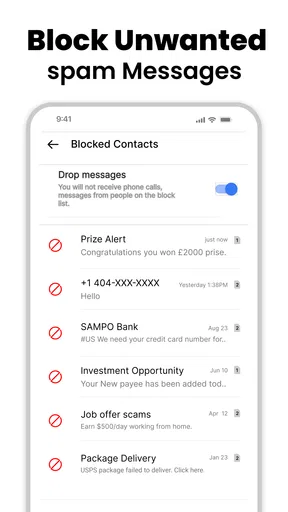
- Spam protection may not catch every unwanted or suspicious message.
- Some advanced options may require in-app purchases or premium access.
Similar Picks in This Category
View All
Google Messages
Google LLC4.6

Gmail
Google LLC4.1

Google Meet
Google LLC4.4

Google Chrome
Google LLC4.1

WhatsApp Messenger
WhatsApp LLC4.6

Carrier Services
Google LLC4.2
Frequently Asked Questions
What is Messages: SMS Texting App, and what can I use it for?
Messages: SMS Texting App is designed for sending and receiving traditional SMS and MMS messages from an Android phone. After setting it as the default messaging application, you can organize conversations, send text messages, share photos or other media, and manage contacts from one interface. Its usefulness depends on your mobile carrier, since standard SMS and MMS services may require an active plan or available credit.
Does Messages: SMS Texting App require internet access to send messages?
Traditional SMS messages generally do not require Wi-Fi or mobile data, although your carrier must provide cellular service and your plan must support texting. MMS messages, such as picture or group messages, commonly require mobile data and may be affected by carrier settings. If the app includes internet-based features, those may require a connection, so users should check permissions, carrier charges, and the app’s current feature list before relying on it.
Can I use this app as my default SMS and MMS messaging application?
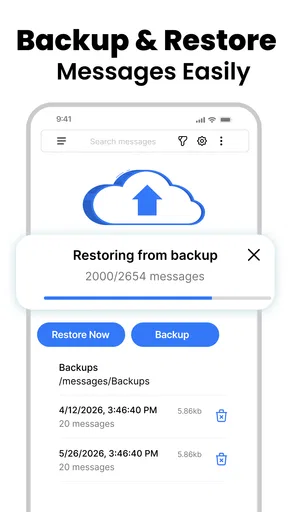
Yes, the app is intended to function as a messaging client, but Android may ask you to select it as the default SMS application during setup. This permission allows it to receive new messages, display conversations, and send replies from your phone. Before switching, review whether your existing app offers backup, spam filtering, or special features that may not transfer automatically.
Is Messages: SMS Texting App safe and private to use?
The app needs access to contacts, SMS messages, and sometimes phone or media permissions in order to provide its core functions. These permissions are normal for a messaging application, but you should review the developer’s privacy policy and the permissions shown on the Google Play listing. Remember that standard SMS is not end-to-end encrypted, so sensitive information should not be shared through ordinary text messages.
Are there any costs, advertisements, or compatibility requirements?
Downloading the app may be free, but sending SMS and MMS messages can still incur carrier charges depending on your mobile plan. Some versions of messaging apps may also include advertisements, optional purchases, or settings that vary by region and device. Compatibility is primarily determined by your Android version and carrier configuration, so checking the store listing before installation is recommended, especially on older phones.
